
Use Socks Proxy
Quick Links
My IP Hide
If you only need to access blocked sites, please try My IP Hide. Here is the comparison between My IP Hide and Socks Proxy Checker.
Affiliate Program
Earn money when a visitor comes from your website buys our product or service. You can get 30% commission on sales. Start to earn now!Socks Partner
Introduce Socks Proxy
Socks proxy includes SOCKS5 proxy and SOCKS4 proxy. They are almost same. SOCKS5 supports UDP (skype needs it) while SOCKS4 not. In most cases either SOCKS4 or SOCKS5 is OK.
All the SOCKS5/4 proxy supports https and high anonymity naturally, so you can use SOCKS5/4 proxy to access all (HTTP/HTTPS) websites such as Craigslist, Youtube, Facebook.
In fact SOCKS5/4 proxy is universal proxy for all your Internet activities while the ordinary (HTTP) proxy can only be used for surfing. You can use SOCKS5/4 proxy to anonymously send email by SMTP, transfer file by FTP, chat by IM/IRC software and play online game.
Use Socks Proxy in Softwares
Many softwares support socks proxy naturally such as Firefox, Filezilla, mIRC, IE, MSN, Outlook, Skype and some others. Here are the instruction of socks proxy settings for them. You need to use Sockscap for the other programs that don't support socks proxy.
Firefox Socks Proxy Settings
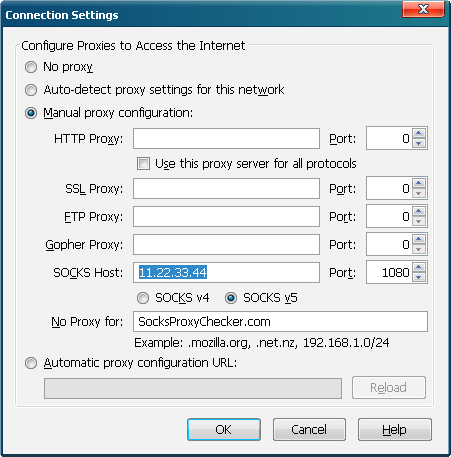
Firefox can use both http proxy and socks proxy. We use socks proxy here. Please click the Firefox menu Tools -> Options -> Advanced -> Network -> Connection -> Settings to set the socks proxy for Firefox. Please input the socks IP and Port for the "SOCKS Host" and keep other options empty or zero. You should check the socks proxy by Socks Proxy Checker before using it.
FTP Proxy Settings
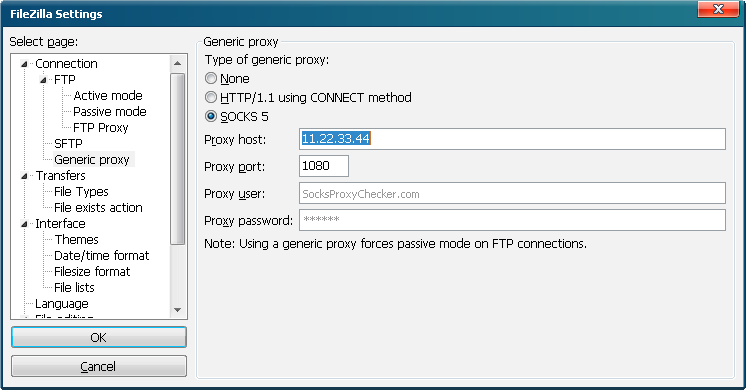
FTP client usually needs socks proxy because few http proxy support FTP. We use the free FTP client FileZilla as example. Please click the FileZilla menu Edit -> Settings -> Connection -> Generic proxy to set the socks5 proxy for FileZilla. You should check the socks5 proxy by Socks Proxy Checker before using it.
IRC Proxy Settings
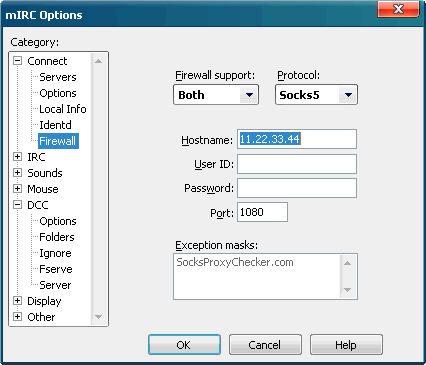
IRC client usually needs socks proxy because few http proxy support IRC. We use the famous IRC client mIRC as example. Please click the mIRC menu Tools -> Options -> Connect -> Firewall to set the socks5 proxy for mIRC. You should check the socks5 proxy by Socks Proxy Checker before using it.
IE Socks Proxy Settings
IE can use both http proxy and socks proxy. We use socks proxy here. The socks proxy setting for IE is somewhat more complex. First please click the IE menu Tools -> Internet Options -> Connections -> Lan Settings to reach this dialog.
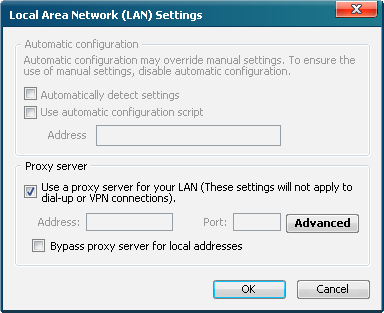
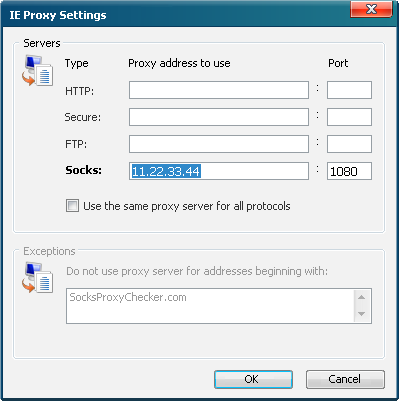
Please check the option "Use a proxy server for your LAN" and then click the Advanced button to set the socks proxy for Internet Explorer. Please input the IP and Port for the "Socks" and keep other options empty. You should check the socks proxy by Socks Proxy Checker before using it.
Note: We find that IE doesn't support some socks proxies with the 27977 port. We recommend Firefox if you want to use those socks proxies in browser.
Skype SOCKS5 Proxy Settings
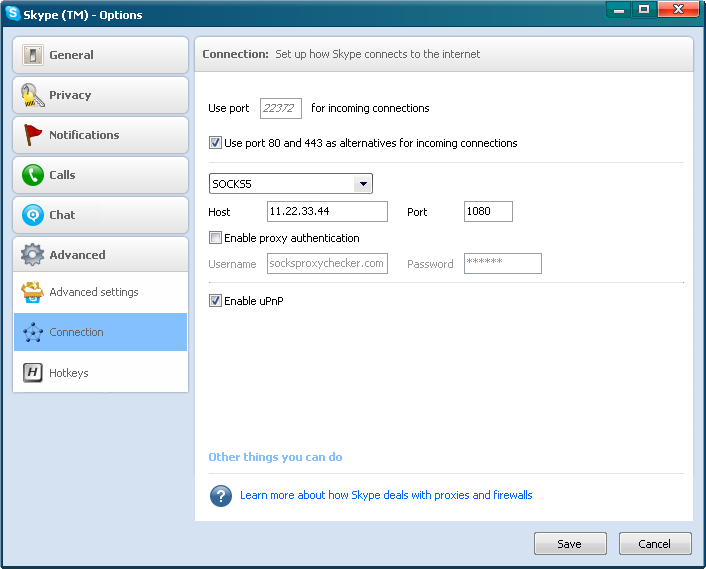
Skype usually needs socks proxy because few http proxy support Skype. Please click the Skype menu Tools -> Options -> Advanced -> Connection -> Settings to set the socks5 proxy for Skype. You should check the socks5 proxy by Socks Proxy Checker before using it.
Socks Proxy Settings for Other Software
Programs such as Outlook Express (email client) and Google Chrome (browser) use the IE Proxy setting. Thus when your IE is using a socks proxy, they will use the same socks proxy. Programs such as Firefox and Skype can "Auto-detect proxy settings of the network". If you enable that option, they will use the IE Proxy setting too.
MSN (IM) use the http proxy of IE while it uses its own socks proxy option. It's enough to use a http proxy in MSN. However notice that MSN will always try direct connection first, then through proxy if that fails. You can use Sockscap to make MSN always use the socks proxy.
Please check the Option dialog of your program to find whether it supports socks proxy. The socks proxy option is usually under the catalog of connection, network or firewall. If the program does not support socks, you have to use Sockscap to make it support socks proxy.

